 Commencing the Descent

4 min read, 1056 words
Commencing the Descent
The gates of hell now ajar; the hellish brute now released; as Bucchianeri once said, “The gates of hell are terrible to behold, are they not?”; but alas, what is to be done now? How are we to enter Inferno? If you remember, we have told our machine where to find its binaries and thus we can simply run Inferno’s emulator by typing sudo emu whenceforth one’s Bash or Zsh prompt disappears; instead, a simple semi-colon becomes visible — you have trot onto Inferno’s ground; you have stepped through the gates of hell, set ajar by our previous actions, and entered Beëlzebub’s realm.
Certainly, it is to be wondered how this differs from our previous operating system — or from our previous shell for that matter —, for it seems like a mere inferior version of what appeared on our screen before. Indeed, it appears to respond to commands in much the same way as our Linux shell. Typing ls yields the same results as doing so on Bash; have our efforts been in vain? Are we to believe that Inferno is but a mere clone of Unix? Nay, it is but the first impressions that are the cause of this confusion; for you must keep in mind that Inferno was indeed created by the same geniuses that had once, in days long past, created Unix.
Undoubtedly proud of their previous achievements, they decided to implement — a wise decision, might I add — a large number of the commands that are to be found in Unix-based systems in Inferno. Yet you should not let yourself get fooled, for this is not Unix — ’tis merely hell hiding in plain sight; and whilst it is indeed possible to use Inferno from its shell only, it does provide a window manager; for, as I hope you remember, they longed to create an operating system that was built with a window manager in mind and not have it be, as was the case with Unix, an afterthought carelessly plastered onto it years later.
Its window manager — simply and rather uncreatively titled wm — can be evoked by typing wm/wm, whereupon one will be greeted by a small window; indeed, its appearance is somewhat dull, consisting of a grey background, and a grey task bar — truly an atrocity to behold. Indeed, it is puzzling, for what is to be done? What is to be clicked? Whence can programs be started and wherefrom is a poor fellow supposed to receive help? Having been tossed down into this abysmal realm of dread, one is reminded of what, in his book Paradise Lost, John Milton writes: —
Seest thou yon dreary plain, forlorn and wild,
The seat of desolation, void of light,
Save what the glimmering of these livid flames
Casts pale and dreadful?

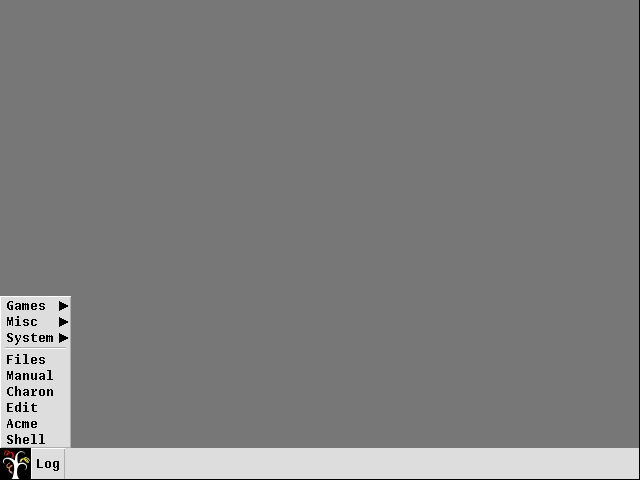
For indeed it seems we have stridden upon a system wholly encompassed by the colour of despair, with no task to accomplish but to gaze upon its grey insipidness. You should not fret, though, for this is but a disguise; hiding beneath its ghastly appearance lie programs who are waiting eagerly to be used. To aid you in your journey, you shall henceforth be provided with photographs of the system as I see it, since I believe this will simplify your journey considerably; indeed, those poor souls whom the ability to use Inferno has not been bestowed, for they lack a proper system install it onto, are what these photographs will aid most substantially, as they may therefore see the happenings of our doings without needing their own installation.
But withal, those keenly-eyed amongst us may have observed the rather small square icon at the very bottom left of the screen, whose appearance is reminiscent of that of a tree, which is situated next to a box of a sickly grey colour containing the text “Log”. The latter’s function should be quickly understood by even the more simple-minded — it opens a window containing logs, which tell us about things that have inevitably gone wrong — and the function of the tree-like one, too, should be easily understood; for what hides in this precise spot on most operating systems? Why indeed, it is the start menu whose function, in most systems, encompasses the display of programs to start.
Even its appearance is rather colourless and uninspiring, for it consists merely of three sub-menus and six readily executable programs — of which there is one titled “Manual” and that shall be the one we will inspect first, as it may prove invaluable to receive some additional information.
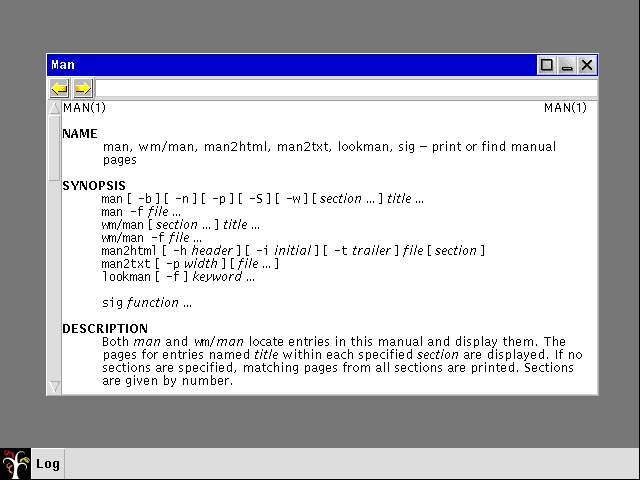
What then appears is a window filled with text — as one would expect a manual to be — and a search bar across the top; this can be used to investigate a particular command’s or program’s function. Thus, if we wished to be presented with information regarding the window manager, simply typing wm into its search and pressing the Enter key will yield said requested information.
This program will prove itself invaluable, for it will dispense information regarding practically every single part of this operating system and we shall be referring back to it frequently.
Time has now come to open Pandora’s box and examine what programs Inferno provides for us, how they are used and what can be done with them. You shall notice the rather intriguing, yet often mysterious and strange, assortment of programs this operating system has to offer which, unfortunately, is much smaller than I had at first anticipated.