 Framework 13 Update – A small fan issue!
This post was published on 05 May 2026
3 min read, 776 words
Framework 13 Update – A small fan issue!
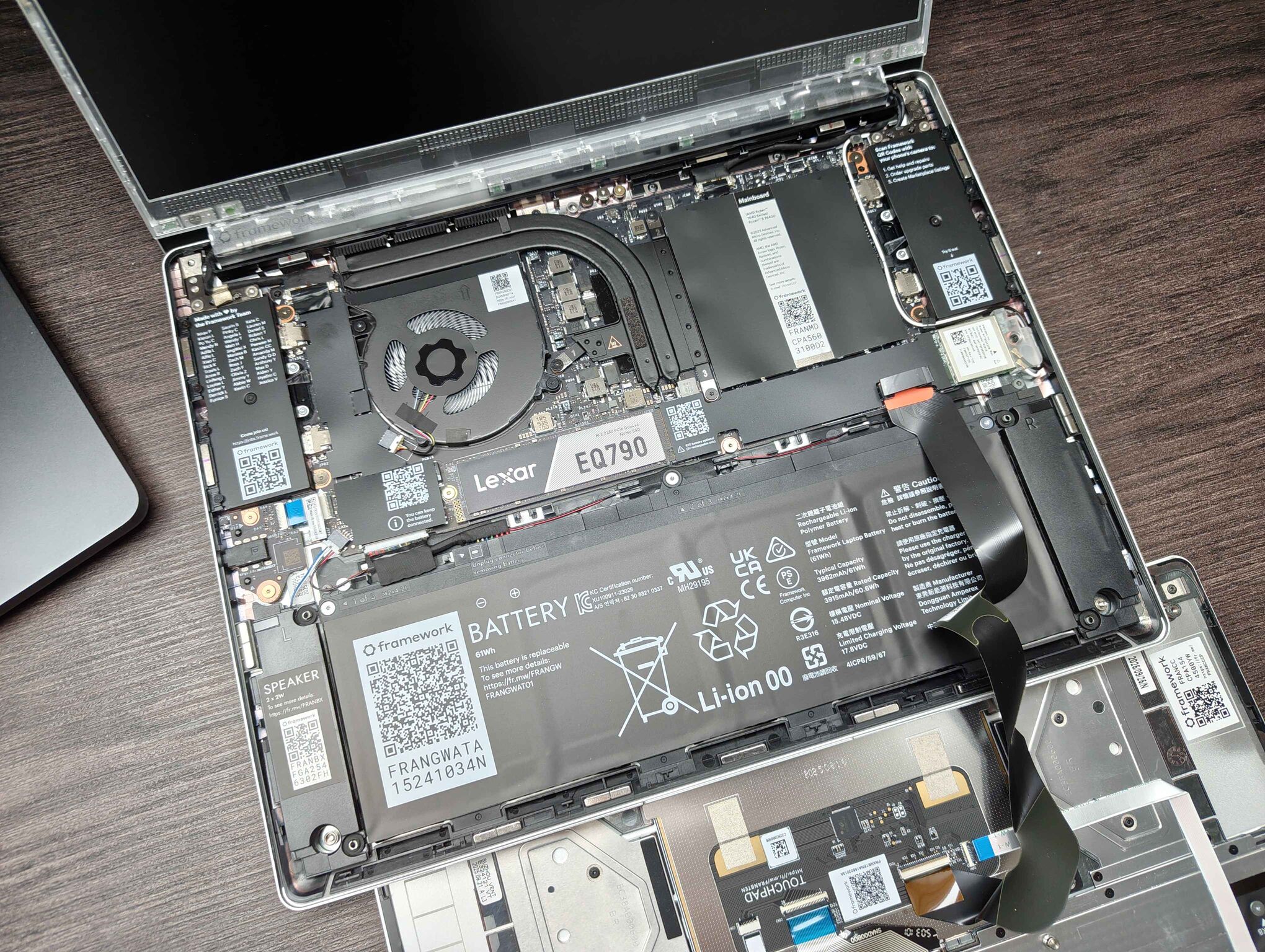
A few weeks ago, I received my new Framework 13 and wrote a rather lengthy blog post about it and how much I enjoyed this laptop. Since then, however, one small issue has cropped up that has ever so slightly dampened the excitement, but their support handled it well enough that I am still quite happy with the overall experience! I also want to briefly mention that the refund I requested has been successfully deposited to my account and it took just a few days for it to arrive.
Brief overview and timeline
I received my Framework 13 on the 15th of April and began noticing a strange grinding noise coming from it on April 26. At first, it mostly happened whenever the fans spun up to a very high RPM and it would be quite noticeable and distracting. The problem, however, disappeared shortly afterwards and I did not pay it any more heed.
On the 28th of April, the problems once again began occurring and not only that, the grinding also began appearing even at lower RPM speeds and you could even feel the entire chassis of the laptop vibrate a tiny amount as the grinding noise was audible. I opened up the laptop and attempted to blow out the fan – and making sure I held the fan in place as I blew air through it – and I also attempted to perhaps “re-seat” the fan blades somewhat by gently pushing down on the fan blades (this was something that was suggested on a forum post). When neither of these fixed the problem, I messaged Framework’s support and asked for help. After a bit of back and forth with their support, a replacement fan and heatsink kit was swiftly sent out to me at no cost. Here is an overview of the entire timeline with times and dates being in CEST (Central European Summer time):
| Date | Time | Event |
|---|---|---|
| 28 April | 16:53 | Initial support ticket submitted |
| 29 April | 01:59 | Framework asks for photos and troubleshooting steps |
| 29 April | 06:37 | Photos and details sent back |
| 29 April | 10:41 | Framework confirms free replacement |
| 29 April | 10:47 | Shipping address provided |
| 29 April | 12:00 | Ticket escalated for RMA |
| 30 April | 04:18 | Replacement order confirmed at no cost |
| 30 April | 12:34 | Replacement shipped |
| 5 May | 08:18 | Delivered |
| 5 May | 08:40 | New fan installed, issue resolved |
Installing the fan
Once the fan finally arrived, I quickly powered down my laptop, removed the old heatsink assembly, wiped off the old thermal paste and installed the new kit (which, by the way, comes with thermal paste already pre-applied!). The installation was smooth and painless and took approximately ten minutes (I was very careful and read each of the provided installation steps carefully, I could have done this much more quickly otherwise). Thus far, the issue appears to have been resolved, but we will have to see whether the issue returns even with this new fan.
The issue with the old fan - as far as I can guess - appears to be a bad bearing. Such things can happen, but I do have to say that this appears to be a rather common issue with their fans, as a quick Google search reveals that plenty of other folk have had the same issue that I have experienced and it may point to a potential QC issue with their fans. It is particularly annoying when such a thing happens just weeks after receiving a new device!
Conclusion and support verdict
Overall, I must admit I am quite happy with the outcome. It would, of course, have been much better if this issue had simply not happened in the first place, but due to these laptops’ repairability, an issue such as this is one which can be quite easily resolved by exchanging the broken piece of hardware – which, in this case, was a matter of mere minutes! I believe their support team answered promptly (especially considering the time differences between where I live and where they are located) and merely the actual delivery itself took a bit longer! The delivery time may have been partially due to the fact that May 1st is a holiday here. Let us just hope that the issue won’t occur on this unit too!