 Deliverance from Limbo

8 min read, 1933 words
Deliverance from Limbo
Indeed, we shall henceforth escape from Limbo; from the edge of Hell itself and ascend to higher grounds; and we shall do so by furthering our knowledge of Limbo itself, for understanding something frequently yields the knowledge that things are not as complex as they may appear.
I shall herein intermittently refer to the previously discussed code snippet and the numbers printed beside each line; I therefore highly urge you to bookmark page , so that you may open the code at a moment’s notice.
The code begins with a comment, a piece of text that the program will ignore and whose sole purpose it is to provide some information to those who read the source code; the comment here is merely stating that the file’s name is hello_world.b. To indicate that a piece of text or code is a comment, one must use the pound (#) symbol, whereafter the line it is located on will be ignored by the compiler.

The first actual piece of code is located on line 3, whereon the current file is marked as being the implementation of the Hello
World module, the name of which can be chosen by the programmer. You may have also observed the semi-colon at the end of this line and it serves a very crucial function; for if you forget the semi-colon, the program will not compile and instead yield the following error: hello_world.b:3: near ’ include ’ : syntax error. You may wonder why this occurs and the answer is rather straightforward: one must add a semi-colon behind every statement; this can be easily forgotten, especially in the beginning, and can quite easily lead to frustration, especially in longer programs — therefore, take heed, for you surely do not wish your program to throw errors at you, which then requires you to scour the file for a missing semi-colon.
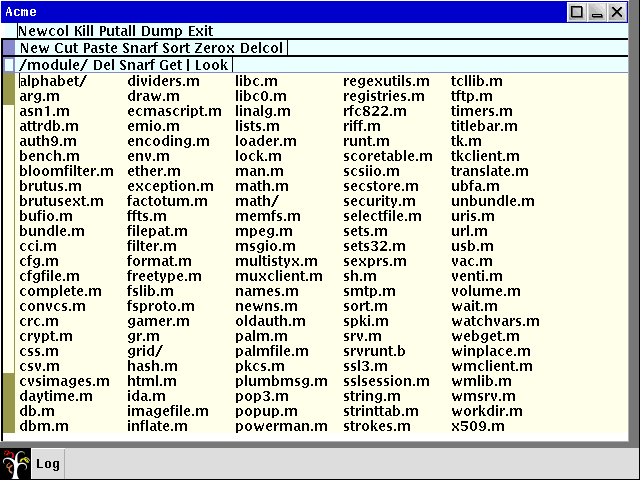
Thereafter we include two of the aforementioned libraries to aid us in creating this program, namely Sys and Draw. Should you wish to view these modules’ code, you can do so by opening the directory wherein your inferno location is located — which, in my case, is /usr/local/inferno — and thereafter open the modules directory within. Placed therein are the libraries one can readily load, including both draw.m and sys.m; as draw.m is not actually needed within our Hello World program, we must merely open sys.m, wherein we can find a large number of lines, each providing a different functionality. Let us glance briefly at the parts we have used in the creation of the Hello World program: —
SELF:	con	"$self";		# Language support for loading my instance

Sys: module
{
	PATH:	con	"$Sys";
	#...
	print:		fn(s: string, *): int;
	#...
}
One of the most important functions of a Hello World program is, rather obviously, the printing of “Hello, World!” onto the screen and this functionality is located within sys.m. The print function is declared therein and it takes a string as its argument — a string is a sequence of letters and symbols, such as “Hello” —, however, in addition to taking a string as its argument, it may take other types of data as well, as indicated by the star. One may also observe the declaration of the PATH constant (con) — a type of data that cannot be altered, unlike a variable —, to which the value of "$Sys" has been assigned; we shall be referring to this again shortly.
Line four of our Hello World program contains the definition of a variable, namely sys; declaring a variable — or, for that matter, functions and other declarable parts of this programming language — adheres to the following formula, wherein DATA must be replaced by what the variable shall store: —
variableName: VariableType DATA;
Thus, if you wished to store the “Hello, World!” text within a constant, you could alter the previous program as follows: —
# hello_world_var.b
# ...

init(ctxt: ref Draw->Context, args: list of string) {
	text: con "Hello, World!\n";
	sys = load Sys Sys->PATH;

	sys->print(text);
}
We thus declared that text shall be retaining data of the con type with the content of "Hello, World!\n" which is then printed using the print function from the sys.m library.
Let us return, however, to the tenth line of our original code, whereon we find the module declaration; which, I sincerely hope you recall, is what would typically be located in its separate .m file — this has, however, been ignored here, for it is unnecessary to split the program, as it us but a mere seventeen lines long — indeed, splitting programs whose scale is as minor as this may actually be detrimental and induce confusion; this is, without a doubt, especially noticeable with those people who are new to the language and, perhaps, even novices regarding computer programming in general. If, however, you longed to create a separate file for your declaration, you would be required to include it as you did the others as well, by adding a third include statement at the top as follows, wherein module_file_name must be replaced by the actual file name you gave the declaration file: —
include "module_file_name.m";
The declaration spans three lines in total, namely nine through eleven and is akin to what one may witness in programs written in programming languages such as Java or C, for those require the creation of a main method, which operates in a similar manner to the init function created within our Hello World program; in Java, it may be written as follows: —
/* main_function.java */

class HelloWorld {
	public static void main(String[] args) {
		System.out.print("Hello, World!\n");
	}
}
One is immediately able to spot the similarities, for the second line of this code snippet serves a function identical to the tenth line of our Limbo program — or rather, almost identical, for in Java, there is no need for a separate declaration as is the case in Limbo. Thus, in Limbo, we are required to both declare and thereafter execute our init function, which one may see from line thirteen onwards, for therein the init function is executed; and in there, the code that will be run can encountered.
Should you be unfamiliar with the different types of brackets that are used — or, indeed, the structure and syntax of functions altogether —, I shall attempt to briefly explain the difference between them; let us thus consider merely lines thirteen and seventeen: —
init(ctxt: ref Draw->Context, args: list of string) {
	#...
}
Everything placed in-between the round brackets is seen as an argument which can be passed to the function, whereas the code placed between curly brackets is the so-called body of the function; if you, for example, wished to create a function that greets people you may do so as follows: —
# greet_function.b

implement Functions;

include "sys.m";
include "draw.m";
sys: Sys;

Functions: module {
	init:   fn(ctxt: ref Draw->Context, args: list of string);
};

greet: fn(text: string): string;

greet(myname: string): string {
	return "Hello " + myname + "\n";
}

init (ctxt: ref Draw->Context, args: list of string) {
	sys = load Sys Sys->PATH;
	sys->print("%s", greet("Hex"));
}
Herein, we created a new function to which the name greet has been appointed; and, as one may hopefully observe, located within the round brackets, the argument one may pass to it is to be seen, namely a string which will thence be saved under the myname variable.
Enclosed by curly brackets, however, the aforementioned function body can be found, wherein the actual code is situated; in this particular instance, the function’s purpose is to return "Hello " + myname + "\n", wherein myname will be replaced by the string passed onto the function.
The function is executed on line 21, placed within the print statement, where it is run with the "Hex" argument, whereupon the function’s output — i.e. "Hello Hex\n — is printed onto the user’s screen.
Let us hence return from this minor divergence and continue on our path towards understanding our Hello World program. Having briefly touched upon the subject of functions, we shall thus begin the dissection of lines 14 and 16, respectively; the statement on line 14 may come across as rather bizarre at first glance: —
sys = load Sys Sys->PATH
Yet, as we have learnt, things frequently but appear to be difficult, whereas, in reality, they can be explained and understood swiftly.
If you recall, on line 7 of our Hello World program, a new variable, namely sys, was created without any contents; the contents are what will be added here. Indeed, we may have included sys.m at the top of our program, but we have not yet created an instance of it — for now it but eagerly awaits to be used. Thus, to create such an instance, we are required to load Sys from where it is located and thereafter store this instance within a variable — which, in this case, is sys. To load such an instance, the syntax load module module
_path is used.
Hence, we can utilise sys.m’s inbuilt PATH constant — as we saw on page — by simply referencing it using an arrow thusly: Sys->PATH; this is the syntax we are required to use whenever we wish to refer to a constant or function within a different module.
Thenceforth, the sys variable will be in the possession of a Sys instance, whereupon we may use it to access sys.m in-built functions, which will be needed on line 16, whereon we refer to the print function of Sys. This particular function, as we ascertained previously, takes a string as its argument, which we here supply as "Hello, World!". The trailing \n is not printed verbatim, as it is a so-called escape character, which, in this instance, creates a new line; had this been left out, our printed text would appear in a rather inept position, behind the % symbol of our shell instead of being located on its own line.
Upon having analysed the Hello World program, let us continue by learning about functions a bit more in detail; thus, in the following section, we will be creating functions capable of performing certain mathematical operations and returning their result; additionally, we shall be studying the differences between a small number of different data types that can be found in Limbo.